Campervan and boat handover inventory from one video
What to film when a campervan or a boat changes hands, what the API records (VIN plate, gas, battery, seacocks) and how to compare the handover with the return.
Your agents know your code, your docs and your calendar, but nothing about the places you live and work in.
Film a space once: Space Context turns the video into structured, cited context any agent can read, search and ask.
Brisbane apartment spc_demo
Areas3
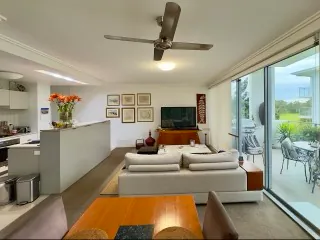 Open-plan Living, Dining and Kitchen 18 items good
  Bedroom 6 items fair
 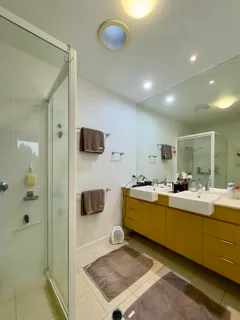 Bathroom 14 items fair
 Key locations2
Inventory38
Ask POST /v1/spaces/spc_demo/ask
Where is the fuse box?
The fuse box is in the Open-plan Living, Dining and Kitchen, in the hallway cupboard behind the coats.
Fuse box (Open-plan Living, Dining and Kitchen) · from narrationWhat is broken in the bathroom?
The portable heater has a loose cable and must not be used until repaired.
"documented": true Cited
Loose heater cable high Bathroom · issue iss_2 frame-30 · 0:30 Quickstart
Connect an assistant without writing code, scan from the terminal, or call the API from your product.
A free test key runs all of it on the demo space.
# Claude Code
claude mcp add --transport http --scope user spacecontext https://mcp.spacecontext.app/mcp

# Codex
codex mcp add spacecontext --url https://mcp.spacecontext.app/mcp
codex mcp login spacecontext

# Claude, ChatGPT, Cursor, VS Code: add a custom connector with this URL
# https://mcp.spacecontext.app/mcp
No key to paste: you sign in, choose what the assistant may see, and it gets its own key you can revoke at any time. Connect an assistant
npx spacecontext login --test          # a free test key, approved in the console
npx spacecontext ask spc_demo "where is the fuse box?"
npx spacecontext skill spc_demo --out ./brisbane-apartment-skill

npx spacecontext scan ./flat.mp4 --name "Seaside flat" --format markdown
login --test shows a code you approve in the console, and a free test key comes back; drop --test for a live key. Every command accepts --json. CLI commands
import { SpaceContext } from '@spacecontext/sdk';

const sc = new SpaceContext({ apiKey: process.env.SPACECONTEXT_API_KEY });

const { spaceId, document } = await sc.scan('./flat.mp4', {
  name: 'Seaside flat',
  onProgress: (p) => console.log(p.type === 'scan' ? p.label : p.type),
});

const answer = await sc.spaces.ask(spaceId, 'Where is the water shut-off?');
console.log(answer.answer, answer.citations);
One call from a video to the document, with live progress. Typed from the OpenAPI contract, no runtime dependencies. TypeScript SDK
API=https://api.spacecontext.app/v1
AUTH="Authorization: Bearer $SPACECONTEXT_API_KEY"

# Ask the demo space (free with a test key)
curl -X POST $API/spaces/spc_demo/ask -H "$AUTH" \
  -H "Content-Type: application/json" \
  -d '{"question": "Where is the water shut-off?"}'

# Follow a scan live, as Server-Sent Events
curl -N $API/scans/$SCAN_ID/events -H "$AUTH"
JSON over HTTPS, an OpenAPI 3.1 contract, one error envelope with stable codes. API overview
Set up in 2 minutes
Hand one prompt to your coding agent, or follow five steps yourself. Test keys are free.
Paste this into Claude Code, Cursor, Codex or ChatGPT: it sets up everything and asks you only to approve sign-in.
Set up Space Context for me.
1. Add the Space Context MCP server to this tool. Claude Code: `claude mcp add --transport http --scope user spacecontext https://mcp.spacecontext.app/mcp`. Codex: `codex mcp add spacecontext --url https://mcp.spacecontext.app/mcp` then `codex mcp login spacecontext`. Cursor: add {"mcpServers":{"spacecontext":{"url":"https://mcp.spacecontext.app/mcp"}}} to ~/.cursor/mcp.json. Any other client (GitHub Copilot, Gemini CLI, Windsurf…): add the remote MCP server https://mcp.spacecontext.app/mcp (Streamable HTTP, OAuth). I will sign in in the browser.
2. Install the Space Context skill: save https://spacecontext.app/.well-known/agent-skills/spacecontext/SKILL.md as ~/.claude/skills/spacecontext/SKILL.md (Claude Code), or keep it as project instructions.
3. For code: `npm install @spacecontext/sdk`, then run `npx spacecontext login` and wait while I approve the code in the browser (the key is saved locally; never print it or commit it).
4. Read https://spacecontext.app/developers/docs/llms.txt, then list my spaces. Live scans need a card on file in the console (nothing is charged when it is added; a new account's first live scan is free, one per card). Sign in to the console and create a key. Test keys are free and work on the demo space.
Get a free test keyOne server URL; the assistant opens the browser and you sign in.
claude mcp add --transport http --scope user spacecontext https://mcp.spacecontext.app/mcpcodex mcp add spacecontext --url https://mcp.spacecontext.app/mcp
codex mcp login spacecontext{
"mcpServers": {
"spacecontext": { "url": "https://mcp.spacecontext.app/mcp" }
}
}Add to ~/.cursor/mcp.json (or .cursor/mcp.json in a project); Cursor then shows a Login button.
code --add-mcp '{"name":"spacecontext","type":"http","url":"https://mcp.spacecontext.app/mcp"}'Or add the same server to .vscode/mcp.json.
https://mcp.spacecontext.app/mcp
Claude: Settings → Connectors → Add custom connector, and paste the URL. ChatGPT: Settings → Apps & Connectors → Advanced → Developer mode, then create a connector with the URL and OAuth.
In Claude Code, the plugin adds the MCP server and a skill that tells Claude how to use it. Other agents read the same skill from its URL.
/plugin marketplace add finikoslab/spacecontext
/plugin install spacecontext@spacecontext
https://spacecontext.app/.well-known/agent-skills/spacecontext/SKILL.md
With a test key, both answer from the demo space.
import { SpaceContext } from '@spacecontext/sdk';
const sc = new SpaceContext({ apiKey: process.env.SPACECONTEXT_API_KEY });
const answer = await sc.spaces.ask('spc_demo', 'Where is the fuse box?');
console.log(answer.answer);# A test key (sc_test_…) answers from the demo space, for free
curl -X POST https://api.spacecontext.app/v1/spaces/spc_demo/ask \
-H "Authorization: Bearer $SPACECONTEXT_API_KEY" \
-H "Content-Type: application/json" \
-d '{"question": "Where is the fuse box?"}'Add a card in the console: nothing is charged, and a new account's first live scan is free (one per card).
Add a cardWhat you get
Space Context turns a video of a physical space into structured, searchable context for AI agents: rooms, items and where they are, condition, issues, key locations such as the water shut-off, and how things work, with the original frames as evidence.
Some examples of use: comparing check-in and check-out, or move-in and move-out; inventories of rentals and properties; evidence for insurance claims; and what an agent should know about an office or a facility. Any space you can film works the same way. The check-in and check-out guide
Areas with type and condition; items with location, quantity, brand and the names people use for them; issues with severity and a next step; key locations; how-to steps; facts; and what the video did not cover.
JSON · versioned{
"id": "itm_32",
"name": "Portable fan heater",
"category": "climate",
"location": "On the floor below the left side of the vanity",
"condition": {
"code": "damaged",
"notes": "The power cable is visibly loose."
},
"issue_ids": ["iss_2"],
"evidence": [
{ "frame_id": "frame-28", "timestamp_ms": 28087 },
{ "frame_id": "frame-30", "timestamp_ms": 30058 }
]
}Every record cites the frames of the original video it was seen in, through short-lived signed links. Each item, issue and key location is then checked again on up to four of them by a second model: on photo, unconfirmed, or from the narration when it cites none.
Signed URLs 0:00 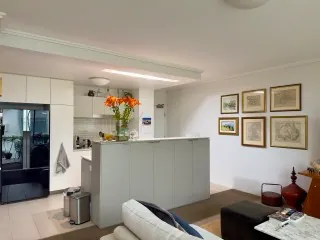 0:15 0:24 0:30
 A short answer from the space’s own records, with its sources and photos, or “not documented”. Never a guess from a typical home.
POST /ask“Where did I see a ladder?” finds the record in any of your spaces, in any language: semantic search with a reranker.
GET /searchCheck-in against check-out: items added, moved, recounted; gone only when a frame shows the empty place; issues new or fixed.
GET /diffExport a space as a skill folder any agent loads on demand, or as one Markdown page to paste into a ticket or a prompt.
SKILL.mdFollow a scan as a stream of events; receive signed scan.completed and scan.failed on your server, with retries.
SSE · HMACWhat to film for each type of space, from flats and offices to cars, boats, campers and appliances; each frame checked in about half a second: usable or not, which key locations it shows.
POST /frames/checkHow it works
No pipeline to build: send the video, follow the scan, read the result.
Walk through with a phone: a video of up to 10 minutes and 4 GB, or up to 120 photos. Say what the camera cannot see: the Wi-Fi, the bins, where the fuse box is.
One call from the SDK, the CLI, an assistant or the console. The analysis runs on our side, with no ffmpeg on yours, and reports every stage as it happens.
Read the Space Document, search it, ask it with citations, compare it with the next scan, or hand it to Claude as a skill.
GET /scans/{id}/events sends the scan at once and at every change, as Server-Sent Events, until the final state. Webhooks for servers that cannot hold a connection.
Pricing
No plan to pick and no subscription: a prepaid balance in US dollars, used only for live scans.
Reading, searching and asking are included.
Prices exclude applicable taxes.
Free
Build the whole integration before you pay anything.
$1.00per scan
Your own spaces, from your own videos.
Let’s talk
Many spaces, many scans, or limits above the defaults.
Pay as you go, no subscription, the balance never expires.
Security
Spaces hold passwords, door codes and words said on camera.
Space Context decides what an agent may read before it reads it.
Wi-Fi passwords, door and alarm codes stay hidden from every key without the spaces:sensitive scope: in documents, search results, answers and exports.
A sign or a sentence on camera that tries to give orders to an AI is withheld before any agent reads it and before the models that write the document, and flagged in the document.
Videos and frames are stored on Cloudflare R2 in the EU jurisdiction, and the source video is deleted once its frames are extracted.
HMAC-SHA256 over the timestamp and the body, sent only to public HTTPS hosts, never redirected, retried with backoff.
Every record points to the frames it was seen in, served through short-lived signed links.
Hashed, shown once, scoped, with an optional monthly spending cap. Each MCP connection gets its own key; the audit log keeps who did what for 400 days.
For agents
A remote MCP server with OAuth, and the files agents look for, at the addresses where they look for them.
list_spaces, search_spaces, get_space by section or get_space_markdown in one page, ask_space with citations, compare_scans, get_evidence_photo.
Allow scanning when you connect and the assistant can create a scan, upload frames, start it and follow it live; it tells you the price first.
Labels, notes and narration that try to give orders to an AI are withheld before any agent reads them and before the models that write the document; the document notes it.
16 tools · resources · prompts · OAuth 2.1 · Streamable HTTP
https://mcp.spacecontext.app/mcp https://spacecontext.app/developers/docs/llms.txt https://api.spacecontext.app/v1/openapi.json https://spacecontext.app/.well-known/mcp/server-card.json https://spacecontext.app/.well-known/agent-skills/spacecontext/SKILL.md https://spacecontext.app/auth.md Something else? Write to support@finikos.it
Space Context is the context layer for the physical world: film a space once (iPhone app, API, CLI or SDK) and it becomes a structured, cited Space Document — rooms, items and where they are, condition, issues, key locations, how things work, with the original frames as evidence — that AI agents read through a REST API, a TypeScript SDK, a CLI and a remote MCP server.
Claude (claude.ai and Claude Desktop), Claude Code, ChatGPT, Codex, Cursor and VS Code, each with its setup steps in the docs, and any client that supports remote MCP servers with OAuth: you add the server URL, sign in in the browser and choose what the assistant may see.
The versioned JSON a space becomes, the same for spaces scanned with the app and through the API: areas with type and condition; items with location, quantity, brand and the names people use for them; issues with severity and a next step; key locations such as the water shut-off or the fuse box; how-to steps; facts; Q&A; and what the video did not show. Every record cites the frames of the original video it was seen in.
Yes, as two examples among many. Scan a space at check-in or move-in and again at check-out or move-out, and the comparison lists items added, moved or recounted, items gone only when a frame shows the empty place, and issues new or fixed, with photos from both scans. The same document serves as a rental or property inventory, as evidence for an insurance claim, or as what an agent knows about an office.
An account (the same as the iPhone app; signing in creates one) and a test key from the console. No card and no cost: the quickstart takes about five minutes on the demo space.
Not to build: test keys are free and need no card. Live scans need a card on file; saving it in the console charges nothing, and a new account's first live scan is free (one free scan per card).
A video (MP4, MOV, M4V, 3GP, WebM or Matroska, up to 4 GB and 10 minutes) or up to 120 photos. The analysis runs on our side: no ffmpeg, no frame extraction on yours.
A few minutes, followed live. Your first live scan is free; then $1.00 each, from a prepaid balance topped up from $10. A failed scan is refunded to the balance.
Yes. Through the SDK or the API with a key that has scans:write, or through MCP when you allow scanning at consent. Agents can also check a frame before scanning.
Every item, issue and key location cites the frames of the original video it was seen in, and a second model, which answers closed questions with probabilities and never writes text, checks it again on up to four of those frames: on photo (0.7 or more on one of them) or unconfirmed. A record that cites no frame comes from the narration, and a fault or something missing is not visible on a photo: neither is checked on one. Facts, instructions and questions and answers are not checked on a photo. Measured on 2026-10-13 on the demo check-out: 38 of 38 items confirmed on one of their frames, and no false confirmation in 227 checks of a room’s items on frames of other rooms. While you film, each frame is checked for the key locations of the type of space; on 191 hand-labelled photos the same day, the key locations measured had a precision of 1.00 at 0.7, except safety equipment (0.89); appliance connections are not measured yet.
Videos and frames are stored on Cloudflare R2 in the EU jurisdiction, and the source video is deleted once its frames are extracted. The AI providers that analyse them are listed in the privacy policy. Sensitive values stay hidden from keys without the sensitive scope.
Yes. They are readable through the API, the console and MCP with the same account, at no cost. API scans are paid from the balance, never from app credits.
The SDK, the CLI, the MCP server, the OpenAPI contract and the docs are MIT on GitHub. The analysis pipeline runs in the API.
Blog
What to film when a campervan or a boat changes hands, what the API records (VIN plate, gas, battery, seacocks) and how to compare the handover with the return.
Apple RoomPlan maps walls and furniture boxes on LiDAR devices. To know what is in a room, where and in what state, from any video, here is the other half.
A vision model can name an object its photo does not show. How Space Context asks every record again on its own frames, and what 38 of 38 and 0 of 227 mean.